Extraction and Review
When you start a protocol from your documents, TrialMind reads them and proposes protocol details. This page explains what TrialMind reads, how to review and correct it, and what is saved.
What extraction does
TrialMind reads the documents you uploaded in the New Protocol wizard and takes out the study information they state. The values it finds are evidence drawn from your documents.
TrialMind is designed to extract information that your documents support and to leave missing information blank. Extraction may be incomplete or inaccurate. Always verify extracted values against the original sources.
Review everything against your documents
Extracted values can be wrong, incomplete, or taken from the wrong version of a document. A value appearing in TrialMind does not mean it has been verified. Check each value against your source documents before you rely on it for a clinical design decision. See Interpreting extracted information.
Review the details
The Details step shows six fields:
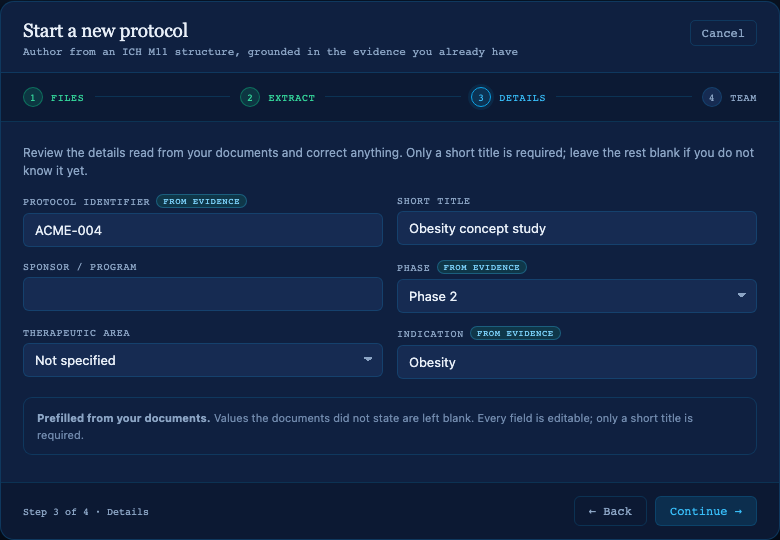
The Details step with synthetic example values. The blank Sponsor / program field was not stated in the documents.
| Field | Notes |
|---|---|
| Protocol identifier | Marked from evidence while it still holds what the documents stated. |
| Short title | Required. |
| Sponsor / program | |
| Phase | Choose from the list, or keep the value read from your documents. Marked from evidence while unchanged. |
| Therapeutic area | Choose from the list, or keep the value read from your documents. |
| Indication | Marked from evidence while unchanged. |
A note above the fields tells you what happened:
| Note | Meaning |
|---|---|
| Prefilled from your documents | At least one value was found. Blank fields were not stated in the documents. |
| Nothing to prefill | Extraction finished, but your documents did not state these details. |
| Extraction did not complete, so nothing was read | Enter the details yourself. |
| The extracted details could not be read | Enter the details yourself. |
Every field can be edited. Only the short title is required; leave the rest blank if you do not know it yet.
Correct a value
- Select a field and change its value, or clear it.
- Check the from evidence label. It disappears when you change a value, because the field no longer holds what the documents stated.
- Select Continue →.
Your corrections are saved when you continue, and they are kept separately from the extracted values. Three things follow from that:
- A value you cleared stays blank. It does not come back from the extracted record.
- Extraction results that arrive later do not overwrite your edits.
- If you go back from Team to Details, the fields keep what you entered.
If the details cannot be saved, TrialMind shows why and stays on Details. Select Continue again.
When values are missing or wrong
| Situation | What to do |
|---|---|
| A field is blank | Enter it, or leave it blank and add it later. Only the title is required. |
| A value is wrong | Correct it in the field. Check your source documents to confirm the right value. |
| Many fields are blank | Your documents may not state them, or some documents may not have been readable. Go back to the Extract step to see which documents could not be used. |
| Extraction failed | Continue and enter the details yourself, or go back and continue again to retry. |
What is saved when you create the protocol
When you select Create protocol ↗, TrialMind saves a draft protocol with your corrected details, linked to your uploaded documents and to the evidence extracted from them. The documents stay available in the protocol's Source Files. See Find a protocol's Source Files.
Evidence is stored, but not shown yet
TrialMind saves the extracted evidence with the protocol, but the Workspace does not display it yet. The extracted values you reviewed in Details are the part you can see today.